Know your app works, without reading a line of code.
OKShip uses your site or app the way a customer would, checks the goals you set, and gives you a plain-English verdict for each one, with a replay video of the run.
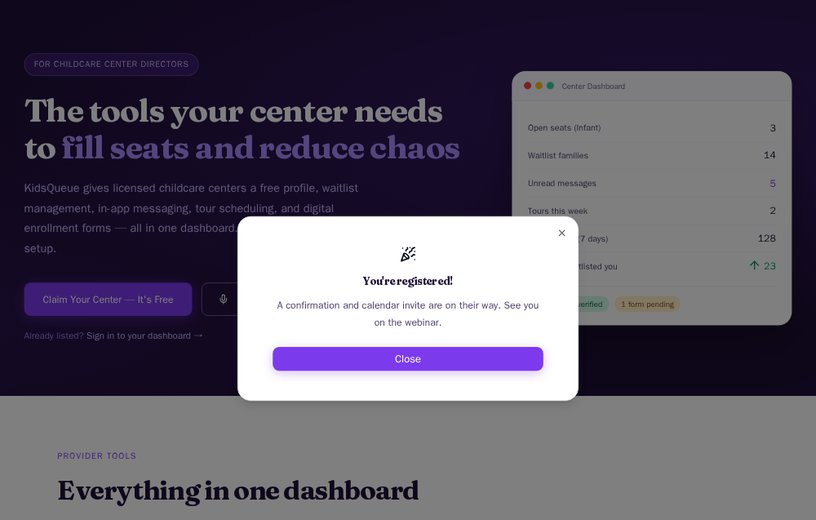
A real run on kidsqueue.com, a live site we run, as your team sees it in OKShip. Pick any point on the right to see where it lives.
kidsqueue.com
Blog Works
User should be able to select a non-member only blog post and read it
The user was able to navigate to the Blog page and open a non-member blog post ("The First Week of Daycare: What Nobody Actually Warns You About"), which loaded fully and was readable without requiring a login or membership.
 0:00replay-84307fb9.mp4
- 1. Followed a link from the home page to /tools-provider
- 2. Opened the webinar sign-up form
- 3. Filled "Your name*" with "Test Visitor"
- 4. Filled "Work email*" with "test.visitor@example.com"
- 5. Submitted the form; the page answered "School name is required"
- 6. Typed, with no field recorded
- 7. Opened the School list
- 8. Picked "a Place Where Kids Are Always First"
- 9. Submitted the form; the site replied 201 and showed "Registered successfully"
You wrote one sentence. OKShip worked out the steps, took them in a real browser, and recorded each one with a screenshot and a time.
Stay in control of what you paid for
Whoever built it, an agency, a freelancer or an AI builder, you get your own answer.
- Before you pay the invoice
Check what was delivered
Run your goals on the finished build before you sign off. If something fails, you have the exact step to send back.
- Before you launch
Launch knowing it works
Checkout, the contact form: confirm each one works the way a customer would use it, not just on your own laptop.
- After every change
Catch what an update broke
Rerun the same goals after each release, or on a schedule on the Builder plan, so a small change never quietly breaks checkout or your contact form.
Share it on your terms
Send one link to your developer, cofounder or investors. Each proof link has its own settings: keep it open, put it behind a password, or ask viewers for their email address first. Set when it expires, set a view limit, and add a button that points back to your product.
From finished build to proof in four steps
- 1
Add your site or app
Paste its address, whether it is live or still on a test address.
- 2
Write the goals in plain English
"A visitor can join the waitlist with their email address and see a confirmation message." OKShip turns each goal into steps. No code.
- 3
OKShip runs them in a real browser
Every action is recorded with a screenshot and a timestamp, and the run is replayed as video.
- 4
Send the proof link
Your developer, cofounder or investors see what was checked and how it went.
How OKShip is different
You have ways to check your product today. None of them give you an answer you can read, show and trust.
| Compared on | Clicking through it yourself | Asking your developer | Uptime monitors | OKShip |
|---|---|---|---|---|
| Who does the checking | You, every release | Your developer, when they have time | A service, every few minutes | OKShip, every time you run it |
| What gets checked | Whatever you remember to click | Whatever they choose to look at | That the site loads | Each goal you wrote, the way a customer would try it |
| What you get | A feeling that it works | “Looks fine to me” | An alert if the site is down | A verdict, every step, and a replay video |
| When something breaks | You, or a customer, notice | A conversation about what you saw | Silence, if the page still loads | The failing step, its screenshot, and why |
| Proof you can show others | Screenshots you took | Their word | A status page | A link anyone can open |
Customers and investors are paying more for products they can trust, and less for ones where they have to take your word for it. OKShip turns that trust into something you can send.
What checking by hand costs you
Clicking through every page after each update, asking your developer whether it still works, hearing about it from a customer. Put in your own numbers and compare.
An estimate from the numbers you enter, not a promise. See every plan on the pricing page.
Questions founders ask
You can start for free. Plans and limits are on the pricing page.
Do I need to know how to code?
No. You write what should work in plain English, and OKShip works out the steps and does the clicking.
Does it matter who built my app?
No. It checks the site in a real browser, the way a customer would, whether an agency, a freelancer or an AI builder made it.
Can I check my app before it is public?
Yes. Point it at any public address, staging or live. It can't reach sites on a private network or behind HTTP basic auth.
Can it check pages behind a login?
Yes. Sign in once from the Connections page, and runs use that session. Runs that use a signed-in session are started by hand rather than on a schedule.
What do I send my developer when something fails?
The proof link. It shows the step that went wrong, the screenshot from that moment and OKShip's explanation. If they want code, download the run as a Playwright script and send it to them.
Can I share results with investors?
Yes. Send the proof link, and put it behind a password if you want to control who opens it.
Will it change anything on my site?
Only what your goals ask for. If a goal submits a form, that form really is sent, so use a test address or test details.
Does it replace my developer or QA?
No. It checks the goals you set and records the evidence, so you know where things stand without having to ask.